

Managing Crawl Budget for Ecommerce Sites: The 2026 Technical Guide
If Googlebot cannot find your product, your customer cannot buy it. It is that simple. In my years auditing large-scale ecommerce platforms, I have seen massive inventories—thousands of SKUs—sitting invisible in the index simply because the search engine ran out of resources before it reached the high-value pages.
Managing crawl budget for ecommerce sites is not just a technical maintenance task; it is a revenue-critical operation. When you have 10,000, 100,000, or a million pages, you are fighting a war against efficiency. Every millisecond of server response time and every unnecessary URL parameter is money left on the table.
In this guide, we are going to move beyond the basics. We will dismantle the mechanics of how Google allocates resources, how to diagnose where you are bleeding budget, and the specific technical implementations to fix it.
The Mechanics: What Actually Constitutes Crawl Budget?
Before we optimize, we must define the mechanism. Many SEOs treat crawl budget as a single, nebulous concept. However, Google Search Central documentation defines it as a balance of two distinct factors: Crawl Rate Limit and Crawl Demand.
1. Crawl Rate Limit (The Speed Limit)
This is the technical ceiling. It represents the number of simultaneous connections Googlebot can make to your site without crashing your server. If your server is slow, Google slows down.
2. Crawl Demand (The Desire)
This is the popularity contest. Even if your server is fast, Google will not crawl your site if the content is stale or lacks authority. Demand is driven by popularity (links) and staleness (how often you update content).
Why This Breaks Ecommerce Sites
Ecommerce sites are uniquely vulnerable because they naturally generate “infinite” URL spaces. Between faceted navigation (filters for size, color, brand), session IDs, and dynamic search results, a single product can theoretically exist on dozens of unique URLs.
If you do not manage this, Googlebot spends its limited budget crawling ?color=blue&size=small&sort=price_desc instead of your new high-margin product launch.
Diagnosing the Leak: Where is Your Budget Going?
You cannot manage what you do not measure. The first step in managing crawl budget for ecommerce sites is an audit using Google Search Console (GSC).
Navigate to Settings > Crawl stats. Do not just look at the graph; look at the breakdown.
The Red Flags of Budget Waste
- High 404/4xx Errors: If more than 5-10% of your crawl activity is hitting error pages, you are asking Google to visit a graveyard.
- Duplicate Content Spikes: Look at the “Crawl requests: breakdown > By purpose” report. If “Refresh” is low but “Discovery” is high on low-value parameter URLs, you have a spider trap.
- Slow Response Times: Google explicitly states that improving server response times to under 200ms can increase crawl limits. If your average response time in GSC is creeping above 500ms, your budget is being throttled.
| Metric | Healthy Range | Danger Zone | Impact on Budget |
|---|---|---|---|
| Server Response Time | < 200ms | > 500ms | Critical: Directly reduces Crawl Rate Limit. |
| 4xx Errors | < 2% of requests | > 10% of requests | High: Wastes resources on dead ends. |
| 5xx Errors | 0% | Any recurrence | Severe: Causes Google to back off crawling entirely. |
| Duplicate URLs | Minimal | > 30% of inventory | High: Dilutes equity across variants. |
The “Silent Killer”: Faceted Navigation and Parameters
Faceted navigation is the single largest destroyers of crawl budget on ecommerce sites. When users filter by price, color, or rating, your CMS often generates a new URL.
The Fix: Canonical vs. Robots.txt vs. Noindex
How do you handle these thousands of variations? You need a decision framework.
- Canonical Tags: Use these when you want to consolidate signals. For example,
shirt-blue-largeshould canonicalize toshirt-main. This tells Google, “I know this exists, but credit the main page.” - Robots.txt: This is the nuclear option. Use this for parameters that provide zero SEO value, like
sort=priceorsession_id. - Noindex: Use this for pages you want users to see but Google to ignore, like internal search results or “add to cart” URLs.
BriteSkies client case study data showed that blocking login and search result pages reclaimed 79.5% more search impressions for a client. This is not theoretical; it is mathematical.
Technical Optimization Strategies
Once you have plugged the leaks, you must optimize the infrastructure.
1. Speed is Currency
If Googlebot can download two pages in the time it takes to download one, you have effectively doubled your crawl budget.
- Implement a CDN: Offloading static assets (images, CSS, JS) allows your main server to respond faster to HTML document requests.
- SSR (Server-Side Rendering): For modern JS frameworks (React, Vue), ensure you are using SSR. If Googlebot has to render client-side JS to see your content, it costs significantly more computing resources, which reduces how often they visit.
2. Internal Linking Structure
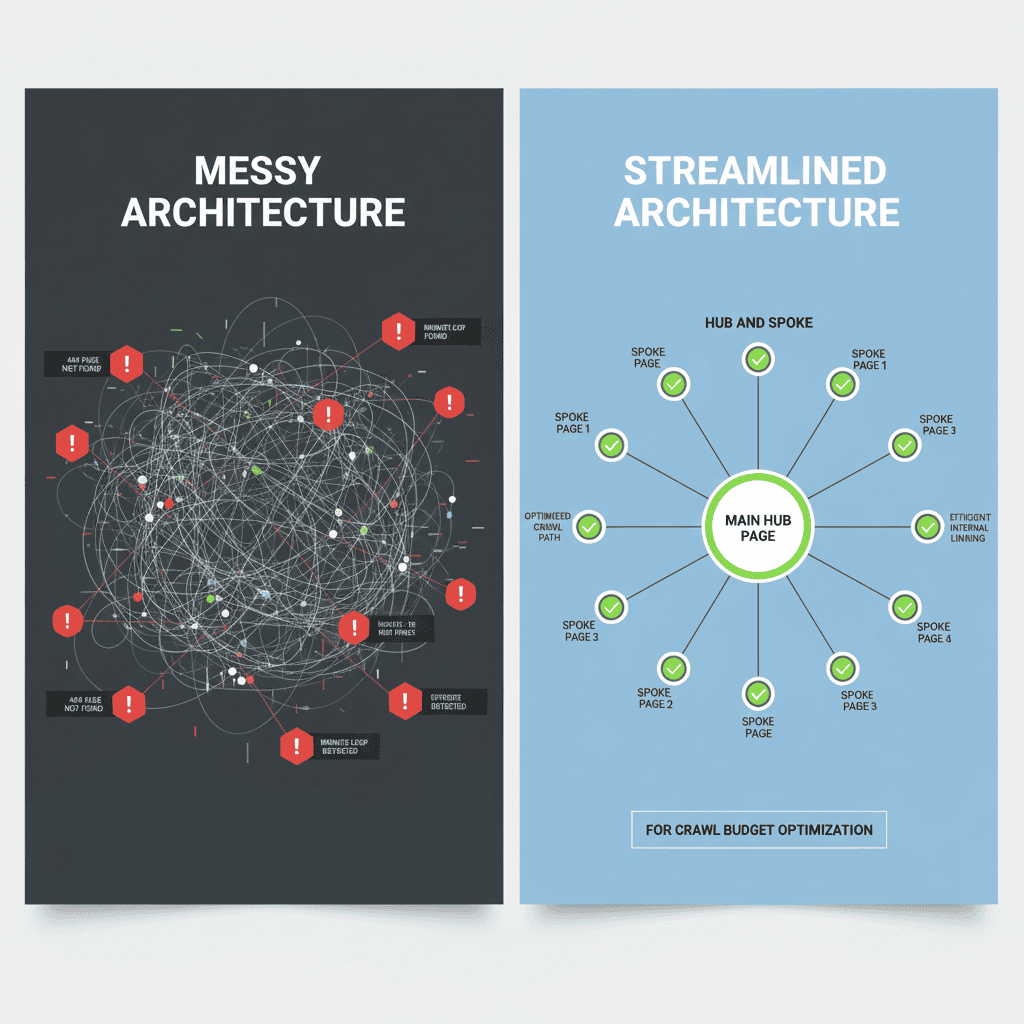
A flat architecture is impossible for a 50,000-product store. You need a Hub and Spoke model.
- Categorization: Ensure every product is within 3 clicks of the homepage.
- Breadcrumbs: Use schema-validated breadcrumbs to help bots understand the hierarchy.
- Related Products: Link smartly. Do not just link random items; link contextually relevant products to create semantic clusters.
This structural efficiency is vital as we look toward the future of SEO for professional firms, where AI-driven search engines (like SGE) rely heavily on clear structural signals to extract and present data.
Advanced Tactics for Large Inventories
For enterprise-level sites, standard practices often fail. Here is how to handle scale.
Split XML Sitemaps
Do not dump 50,000 URLs into one sitemap. Split them by category or product type.
- Why?: It allows you to diagnose indexing issues per category in GSC. If your “Shoes” sitemap has 90% indexation but “Accessories” has 20%, you know exactly where to look.
- Strategy: Conductor’s insights suggest that organizing sitemaps logically helps search engines prioritize effectively, especially when dealing with millions of pages.
Managing Discontinued Products
Ecommerce inventories churn. When a product dies, what happens to the URL?
- Permanent Removal: If it is never coming back and has no backlinks, 404 (or 410) it. Let it die to save budget.
- Redirect: If it has backlinks or traffic, 301 redirect to the closest relevant parent category. Do not redirect to the homepage (soft 404s).
- Out of Stock: If it is coming back, keep the page live but remove it from internal category links to reduce crawl priority temporarily.
This decision process is similar to choosing between local SEO vs national SEO; you must decide if the asset serves a specific, current purpose or if it is diluting your overall authority.
Monitoring and ROI: The Feedback Loop
Optimization is not a one-time setup. It is a cycle. After implementing these changes, watch your “Crawl Stats” in GSC. You should see:
- Crawl requests increasing: Google notices the server is faster.
- Average response time decreasing: The technical fixes are working.
- Total indexed pages rising: The budget is being spent on discovery, not maintenance.
According to a crawl budget optimization guide, efficient crawling leads to faster indexing of new inventory. This means your new products hit the SERPs days or weeks faster than competitors who ignore these metrics.
As you refine these technical aspects, you are also building a more robust digital presence. Just as you might build your personal brand with AI to leverage new tools for efficiency, you must leverage technical SEO to ensure your ecommerce site’s authority is recognized by search engines.
FAQ: Common Crawl Budget Questions
1. How do I check my site’s crawl budget usage?
Go to Google Search Console > Settings > Crawl stats. Look at the “Total crawl requests” over the last 90 days. Compare this against your “Average response time.” A sudden drop in crawling often correlates with a spike in response time.
2. When does crawl budget become a problem?
Generally, sites with fewer than 10,000 pages do not need to worry about this unless they have severe technical errors (infinite loops). However, for ecommerce sites with 10k+ products + faceted navigation, it is almost always a concern.
3. Should I block parameters with robots.txt or use canonical tags?
- Use Robots.txt for parameters that generate thousands of low-value pages (e.g.,
sort=,sessionid=,price_min=) to prevent crawling entirely. - Use Canonical tags for pages that are very similar but potentially useful (e.g.,
?color=blueif the content barely changes). Note that Google still has to crawl the page to see the canonical tag, so robots.txt is better for saving budget.
4. Does site speed really impact crawl budget?
Yes. Googlebot has a time limit. If your server takes 2 seconds to respond, Googlebot can crawl fewer pages in its allocated slot than if your server responds in 200ms. Speed equals capacity.
Conclusion
Managing crawl budget for ecommerce sites is about ruthlessly prioritizing quality over quantity. It is about telling Google, “Look here, not there.”
By optimizing your server speed, strictly managing your faceted navigation, and structuring your internal links, you ensure that every unit of crawl budget is spent on pages that drive revenue. Do not let your best products languish in the dark corners of your database. Open the highways for the crawlers, and the traffic will follow.